
Key takeaway: Managing a small practice without an operations team requires integrating cloud-based management software to automate scheduling and billing. By centralizing EHR data and using automated SMS reminders, clinics can eliminate administrative silos and meaningfully reduce no-show rates. This digital shift reduces overhead and allows a lean staff to focus entirely on delivering high-quality patient care.
Cloud-based practice management software has become the backbone of modern medicine, with global adoption rising as practitioners seek to eliminate IT overhead. Yet, many clinicians still struggle to balance patient care with administrative friction, often losing hours to manual data entry and missed appointments. You are likely feeling the weight of managing a small health practice without an operations team, where every administrative bottleneck directly impacts your bottom line.
This guide explores how to integrate automation and cloud solutions to streamline your workflow. We will examine the specific tools and strategies needed to maintain a lean, efficient, and secure clinic without hiring a dedicated manager.
- How to Manage Small Health Practice Workflows With Automation
- 3 Methods to Streamline Patient Flow and Finances
- Building a Lean Team Culture Without a Manager
- Is Your Clinic Data Actually Secure Today?
How to Manage Small Health Practice Workflows With Automation
Efficient clinic management hinges on separating administrative practice software from clinical EHR systems to prevent data silos. Cloud-based tools eliminate IT overhead while automated intake and SMS reminders help reduce no-show rates, directly improving the bottom line.
The distinction between administrative and clinical tools is the first hurdle in building this digital framework.
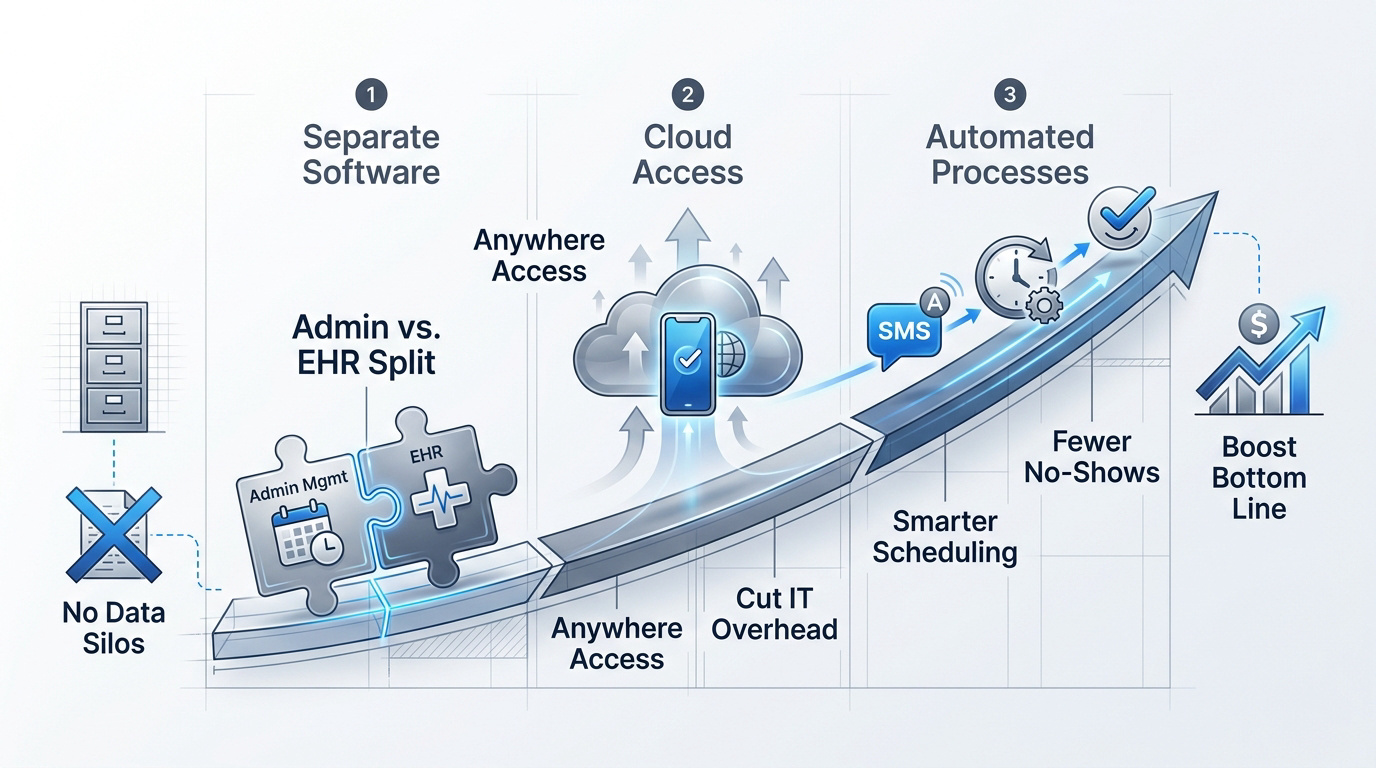
Distinguishing Between Practice Management Software and EHR
Practice management handles the money and scheduling. EHR focuses on the patient health journey and medical notes. Do not confuse them.
Integration stops data silos. Small clinics often waste hours re-typing names. Syncing these systems keeps your database clean and fast. Workflow efficiency starts here.
Implementation takes time. Expect a month for full staff onboarding. Rushing leads to messy data entries. Solid training prevents future technical headaches. Patience pays off eventually.
Cloud-Based Accessibility for Solo Practitioners
Access your clinic anywhere. Modern practitioners need data on their phones. Cloud solutions break the chains of the office desk. Freedom is a choice.
Forget expensive servers. On-site IT can be a significant cost burden for small offices. Let the provider handle security and updates. Cut your overhead now.
Scalability is built-in. Your software grows as your patient list expands. No need for hardware upgrades every two years. Digital tools adapt to your success. Think about future growth.
3 Methods to Streamline Patient Flow and Finances
Managing the back-end is vital, but the real magic happens when you fix how patients move through your system and how money enters your bank account.
Digital Intake Portals and Reduced Administrative Friction
Paper forms are relics. Digital portals let patients fill data at home. This clears the waiting room clutter. Stop the paper trail.
Automation kills manual entry. Your front desk staff can finally breathe. Accuracy improves significantly today.
Patient-led scheduling brings peace. No more endless phone tag. The office stays quiet and focused. Tranquility is a business asset.
Revenue Cycle Management Without a Billing Department
Verify insurance early. Software checks eligibility before the appointment starts. This prevents awkward payment talks later. Get paid on time.
Automated billing cycles work. Claims go out without human intervention. Errors drop when code is involved. Cash flow remains steady.
Skip the external billers. Software modules handle the heavy lifting. Keep your profits internal.
Minimizing No-Shows Through Automated Reminders
SMS reminders are powerful. Patients forget, but their phones do not. A simple text saves your morning. Reduce empty time slots.
Handle cancellations with grace. Have a digital protocol ready. Protect your daily revenue.
Waitlist automation fills gaps. The system texts the next person instantly. Your schedule stays full without effort. Efficiency is purely automatic.
Building a Lean Team Culture Without a Manager
Efficiency isn’t just about software; it’s about the humans running it, especially when you don’t have a middle manager to buffer the stress.
Cross-Training Strategies for Multi-Role Staff
Small teams need versatility. Everyone should know the basics. A medical assistant can answer phones. Flexibility is your strength.
Create clear operating procedures. Document every single daily task. This keeps the clinic running during sickness. Consistency is the goal for everyone. Standardize your daily operations.
Training builds professional confidence. Staff feel valued when they learn. It reduces the panic of absences. Invest in your people.
Cross-training prevents bottlenecks. Keep the flow moving.
Preventing Burnout in High-Pressure Environments
Watch for administrative fatigue. Repetitive tasks drain the soul. Identify the signs before staff quit. Mental health matters here.
Prioritize clinical care always. Shift the paperwork to the machines. Let your team focus on patients. This reminds them why they started. Focus on the mission.
Positive culture retains talent. Small offices feel like family. Celebrate the small wins every week. Kindness is a strategy.
Burnout is a choice. Choose better workflows instead.
Is Your Clinic Data Actually Secure Today?
You can have the best team and the fastest flow, but a single data breach can severely damage your reputation, finances, and patient trust.
HIPAA Compliance and Cybersecurity for Small Offices
Encryption is not optional. Use multi-factor authentication for everything. Protect your patient records like gold. Security is a foundation.
Avoid non-compliant chat tools. Texting patient names is a risk. Use secure portals for all communication. The legal fines are devastating. Stay within the law.
Audit your systems regularly. You don’t need an IT expert. Just follow a basic security checklist. Be proactive, not reactive.
Data safety builds trust. Trust is your currency.
Performing a Tech Cost-Benefit Analysis
Calculate your software ROI. Compare the monthly fee to labor. Automation usually wins the math battle. Numbers do not lie.
Track your medical supplies. Inventory waste is a silent killer. Digital tracking saves thousands of dollars. Small clinics need this extra cash. Watch your supply chain.
Use analytics for expansion. Data shows when to hire. It shows which services are profitable. Grow with hard evidence.
Technology is an investment. Make it count today.
Modernizing your small health practice workflows through cloud-based automation and integrated EMR systems eliminates administrative friction while securing patient data. By centralizing billing and scheduling, you reclaim vital time for clinical care. Implement these digital tools today to ensure a scalable, profitable, and stress-free future for your clinic.
FAQ
What is the main difference between Practice Management Software and an EHR?
While often used interchangeably, these tools serve distinct purposes. Practice Management Software acts as the operational backbone, handling administrative duties like scheduling, billing, and financial reporting. In contrast, an Electronic Health Record (EHR) is the digital version of a patient’s medical chart, focusing on clinical data such as histories, medications, and treatment plans. Do not confuse them if you want a smooth workflow.
For a small clinic, integrating both ensures that administrative tasks and clinical notes talk to each other. This prevents data silos and stops your team from re-typing names across different systems. Workflow efficiency starts here, allowing you to manage the entire patient journey from one digital ecosystem.
How do cloud-based solutions benefit a solo practitioner?
Cloud-based tools offer unparalleled freedom by allowing you to access your clinic data from any device, anywhere. This eliminates the need for expensive on-site servers and the “money pit” of local IT maintenance. By letting a provider handle security and updates, you significantly cut your overhead now while maintaining 24/7 accessibility. Freedom is a choice for the modern practitioner.
These systems are also built for scalability. As your patient list grows or you expand to new locations, the software adapts without requiring hardware upgrades every two years. Digital tools provide a foundation that supports success without the technical headaches of traditional infrastructure. Think about future growth from day one.
Can automation really reduce patient no-shows?
Absolutely. Automated SMS and email reminders are incredibly powerful because while patients might forget an appointment, their phones do not. A simple automated text can save your morning and reduce empty time slots significantly. It’s a hands-off way to protect your daily revenue without your staff making dozens of phone calls.
Furthermore, waitlist automation can instantly fill gaps left by last-minute cancellations. When a slot opens, the system automatically notifies the next person in line, keeping your schedule full without manual effort. Efficiency is purely automatic when you leverage these digital protocols.
How does digital intake improve clinic finances?
Digital intake portals eliminate the “paper trail” by allowing patients to complete forms at home. This reduces administrative friction and clears waiting room clutter. More importantly, it allows for early insurance verification. Software can check eligibility before the patient even arrives, which prevents awkward payment talks and ensures you get paid on time.
By automating the revenue cycle, claims can be processed with minimal human intervention. This reduces coding errors and ensures that cash flow remains steady. Small clinics can skip the cost of external billers by using integrated software modules to keep profits internal. Accuracy improves significantly today with these tools.
Why is cross-training essential for a lean health team?
In a small practice without a dedicated operations manager, versatility is your greatest strength. Cross-training ensures that a medical assistant can handle the front desk or answer phones when needed. This prevents bottlenecks and keeps the clinic running smoothly even during staff sickness. Flexibility is your strength in a high-pressure environment.
To make this work, you must document every daily task through clear operating procedures. Standardizing operations ensures consistency and builds professional confidence among your team. When staff members feel valued and capable of handling multiple roles, it reduces panic and improves the overall culture. Invest in your people to ensure the flow never stops.
How can a small practice ensure HIPAA and data security?
Security is the foundation of patient trust. Small offices must use encryption and multi-factor authentication for all records. It is critical to avoid non-compliant chat tools; texting patient names is a major risk that can lead to devastating legal fines. Stay within the law by using secure, dedicated portals for all communication.
You don’t need a full-time IT expert to stay safe. Regularly auditing your systems against a basic security checklist allows you to be proactive rather than reactive. Protecting patient data like gold builds the reputation of your practice. Trust is your currency, and robust cybersecurity is how you protect it.
FAQ
What is the main difference between Practice Management Software and an EHR?
While often used interchangeably, these tools serve distinct purposes. Practice Management Software acts as the operational backbone, handling administrative duties like scheduling, billing, and financial reporting. In contrast, an Electronic Health Record (EHR) is the digital version of a patient’s medical chart, focusing on clinical data such as histories, medications, and treatment plans. Do not confuse them if you want a smooth workflow.
For a small clinic, integrating both ensures that administrative tasks and clinical notes talk to each other. This prevents data silos and stops your team from re-typing names across different systems. Workflow efficiency starts here, allowing you to manage the entire patient journey from one digital ecosystem.
How do cloud-based solutions benefit a solo practitioner?
Cloud-based tools offer unparalleled freedom by allowing you to access your clinic data from any device, anywhere. This eliminates the need for expensive on-site servers and the “money pit” of local IT maintenance. By letting a provider handle security and updates, you significantly cut your overhead now while maintaining 24/7 accessibility. Freedom is a choice for the modern practitioner.
These systems are also built for scalability. As your patient list grows or you expand to new locations, the software adapts without requiring hardware upgrades every two years. Digital tools provide a foundation that supports success without the technical headaches of traditional infrastructure. Think about future growth from day one.
Can automation really reduce patient no-shows?
Absolutely. Automated SMS and email reminders are incredibly powerful because while patients might forget an appointment, their phones do not. A simple automated text can save your morning and reduce empty time slots significantly. It’s a hands-off way to protect your daily revenue without your staff making dozens of phone calls.
Furthermore, waitlist automation can instantly fill gaps left by last-minute cancellations. When a slot opens, the system automatically notifies the next person in line, keeping your schedule full without manual effort. Efficiency is purely automatic when you leverage these digital protocols.
How does digital intake improve clinic finances?
Digital intake portals eliminate the “paper trail” by allowing patients to complete forms at home. This reduces administrative friction and clears waiting room clutter. More importantly, it allows for early insurance verification. Software can check eligibility before the patient even arrives, which prevents awkward payment talks and ensures you get paid on time.
By automating the revenue cycle, claims can be processed with minimal human intervention. This reduces coding errors and ensures that cash flow remains steady. Small clinics can skip the cost of external billers by using integrated software modules to keep profits internal. Accuracy improves significantly today with these tools.
Why is cross-training essential for a lean health team?
In a small practice without a dedicated operations manager, versatility is your greatest strength. Cross-training ensures that a medical assistant can handle the front desk or answer phones when needed. This prevents bottlenecks and keeps the clinic running smoothly even during staff sickness. Flexibility is your strength in a high-pressure environment.
To make this work, you must document every daily task through clear operating procedures. Standardizing operations ensures consistency and builds professional confidence among your team. When staff members feel valued and capable of handling multiple roles, it reduces panic and improves the overall culture. Invest in your people to ensure the flow never stops.
How can a small practice ensure HIPAA and data security?
Security is the foundation of patient trust. Small offices must use encryption and multi-factor authentication for all records. It is critical to avoid non-compliant chat tools; texting patient names is a major risk that can lead to devastating legal fines. Stay within the law by using secure, dedicated portals for all communication.
You don’t need a full-time IT expert to stay safe. Regularly auditing your systems against a basic security checklist allows you to be proactive rather than reactive. Protecting patient data like gold builds the reputation of your practice. Trust is your currency, and robust cybersecurity is how you protect it.
Read next: The Health and Wellness Wheel: A Practical Map for Balance